


Raising Digitally Safe Children in Australia: A Parent’s Essential Role
A practical guide for Australian parents on protecting children online — covering age-appropriate access, key risks, filtering tools, and why parental involvement matters most.
Australia’s children and teenagers are growing up in an always-connected world. From homework and friendships to entertainment and creative expression, the internet is woven into the fabric of daily life.
But this digital landscape also carries very real risks — from exposure to harmful content to contact with dangerous strangers.
The good news is that parents, carers, and guardians are the single most powerful force in keeping young Australians safe online. This guide explains the landscape, the risks, and — most importantly — what you can do.
My recent article on problems with Online Identity and Age Verification and government overreach raised some concerns from our readers regarding protecting our children from harm.
We need a free and open internet, but we also need to provide a framework for responsible usage and to empower parents to be able to implement protections for their children. I hope to address this balance by providing this guide for parents and others.
We cannot rely on technology or government for these protections, as we can get trapped in a false sense of security. The Australian Government’s current ban on under-16-year-olds’ access to social media has been a dismal failure and is considered a joke by most young people.
Fake profiles, VPNs (Virtual Private Networks), and circumventing age verification by scrunching your face to look older when an ID image is provided are some very well-known simple techniques being used by young people. The cure is worse than the disease, as many parents have zero involvement with their children’s online lives due to a false sense of security.
Drawing on my own understanding from working in IT security for decades, and guidance from organisations such as the Government of South Australia Department for Child Protection, the Communications Alliance, Telstra, and other internet providers, this article explores how families can protect children and teens online while fostering responsible digital independence.
The Reality of Online Risks for Young Australians
Children and teenagers face four broad categories of online risk:
- Content risks: Exposure to harmful or inappropriate material such as pornography, violence, or extremist content
- Contact risks: Interactions with strangers, including online grooming or exploitation
- Conduct risks: Behaviour such as cyberbullying, sharing explicit images, or engaging in harmful online communities
- Contract risks: Financial exploitation, scams, or unintended purchases through apps and games
Teenagers, in particular, are vulnerable because they are exploring identity, relationships, and independence—often without fully understanding consequences.
Age-Appropriate Internet Use
Not all online access is suitable for all ages. A staged, age-appropriate approach is essential:
In general,
Under 12 years:
- Should have highly restricted, supervised access
- Use child-friendly platforms with strong filters
- Devices ideally kept in shared family spaces
Under 6 Years: Supervised and Curated Only
Children under six should only access the internet with a parent or carer present. All content should be pre-selected and age-appropriate. Dedicated children’s apps, audiobooks, and educational platforms are ideal. Screen time should be limited as per Australian paediatric guidance.
6–9 Years: Guided Exploration
Children in this age bracket can begin exploring with guidance. Use a family computer in a shared room, apply child-specific filters (Class 3 in Australia’s Family Friendly Filter system), and begin conversations about what they see online. Introduce simple rules: never share your real name, address, or school online.
10–11 Years: Building Digital Literacy
Pre-teens are curious and increasingly independent. This is the age at which risks dramatically increase — and also when groundwork for safe digital habits must be laid. Parental controls remain essential, and monitoring should be active. Begin discussing cyberbullying, stranger danger online, and the permanence of anything posted publicly.
Early teens (12–15)
- Gradual increase in independence, but with clear rules and monitoring
- Education on privacy, social media, and respectful communication
- Limited exposure to open platforms without safeguards
Older teens (16–18)
- Greater autonomy, but still guided by ongoing conversations and expectations
- Encouraged to think critically about online content and behaviour
- Supported in developing self-regulation and risk awareness
Teenagers need to build skills and knowledge to manage risks independently—but this development must be guided, not assumed.
Key Threat Areas
1. Exposure to Pornography
Pornography is one of the most prevalent online risks. Early exposure can distort views of relationships, intimacy, and consent.
Protective steps:
- Install family filters and safe search settings
- Use ISP-level filtering tools offered by providers
- Have honest, age-appropriate conversations about sexuality and respect
2. Gambling and Financial Risks
Online games often include gambling-like features such as loot boxes, and teenagers can be drawn into betting platforms.
Protective steps:
- Disable in-app purchases or require passwords
- Monitor bank and app transactions
- Teach financial literacy and the risks of “easy money”
3. Online Grooming and Exploitation
Predators often use social media, gaming platforms, and messaging apps to build trust with young people.
Warning signs:
- Secrecy about online contacts
- Sudden behavioural changes
- Receiving gifts or money from unknown sources
Protective steps:
- Encourage open communication
- Know who your child is interacting with
- Teach them never to share personal information or images
4. Cyberbullying
Unlike traditional bullying, cyberbullying can be relentless and public.
Protective steps:
- Encourage children to report and block offenders
- Keep evidence (screenshots)
- Reinforce empathy and respectful behaviour
Mobile Devices vs Computers: Why It Matters
The shift from desktop computers to smartphones has significantly changed the risk landscape.
Computers (traditional family devices):
- Typically located in shared spaces
- Easier to supervise
- More compatible with parental control software
Mobile devices (smartphones/tablets):
- Private and portable
- Harder to monitor
- Provide constant internet access, including late at night
Because of this, mobile devices present a higher risk if not properly managed.
Practical strategies:
- Set device-free zones (e.g., bedrooms at night)
- Use parental control apps and screen time limits
- Require younger teens to use devices in common areas
Gaming Consoles – A hidden risk
Gaming consoles — PlayStation, Xbox, Nintendo Switch — are often overlooked in online safety conversations, but they are fully internet-connected devices with social features, voice chat, messaging, and purchasing capability.
All major consoles have parental control features that allow parents to restrict content ratings, limit screen time, control spending, and monitor communications. These should be configured from the moment a console enters the home.
The Critical Role of Parents
Children learn by watching. If you are on your phone during family meals, scroll mindlessly before bed, share content without verifying it, or react angrily to things you see online, your child is learning those habits too.
Modelling healthy digital behaviour — being present offline, thinking critically before sharing, respecting privacy, and managing screen time — teaches your child what good digital citizenship looks like in practice.
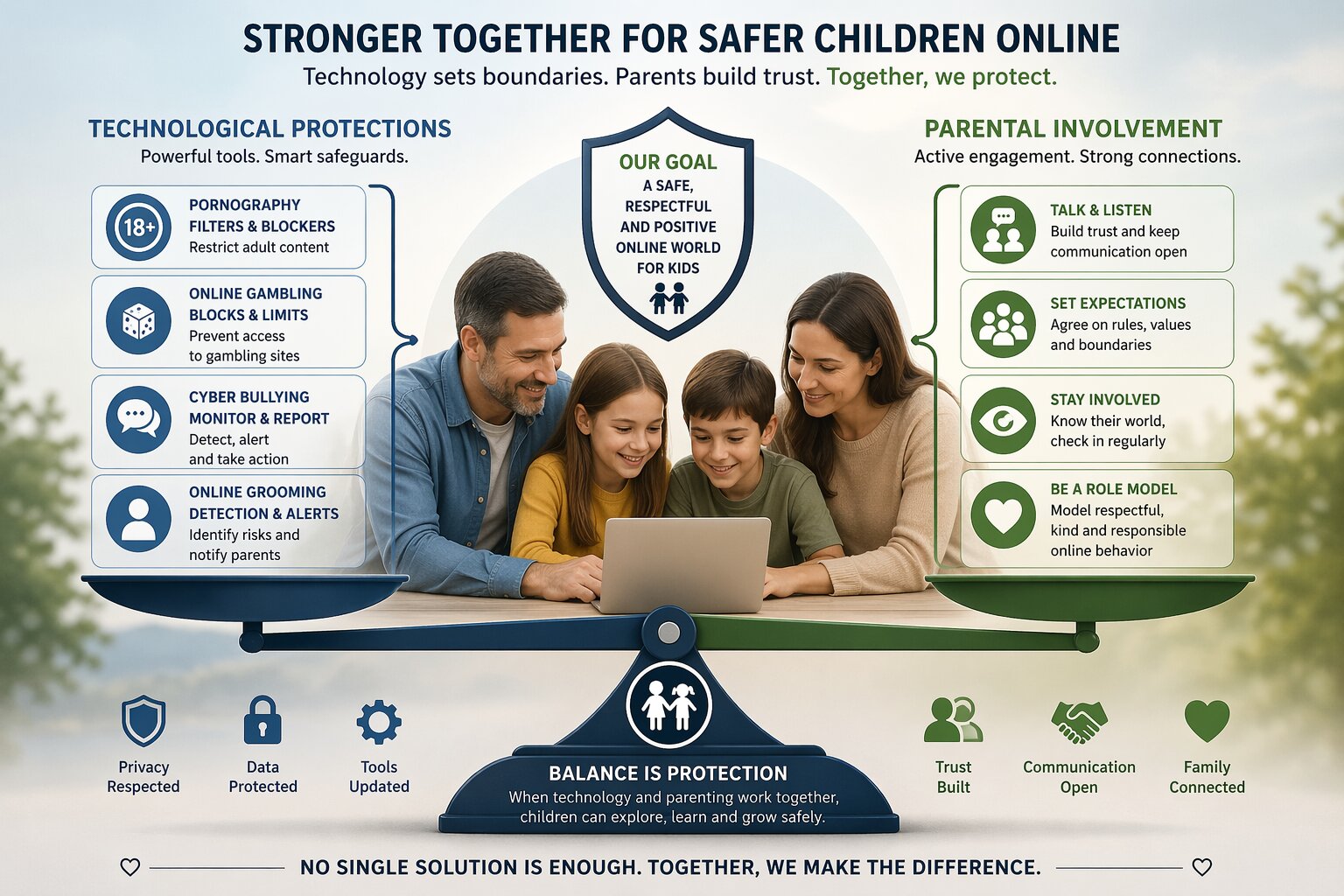
Technology alone cannot protect children. Parents are the primary line of defence.
Children need more than filters—they need guidance, values, and relationship-based protection.
Why parental involvement matters:
- Children are more likely to report problems if trust is strong
- Rules without relationship often lead to secrecy; this is a critical issue
- Ongoing conversations help children internalise safe behaviours
Key Responsibilities for Parents
1. Be a Role Model
Children observe how parents use technology. Demonstrating healthy habits—such as limiting screen time and respectful online communication—sets a powerful example.
1 Corinthians 11:1 Imitate me, just as I also imitate Christ.
2. Stay Involved and Informed
- Know what apps and platforms your child uses
- Understand basic privacy settings and risks
- Keep up with emerging trends
3. Have Ongoing Conversations
Regular discussions should include:
- Online reputation (what they post lasts)
- Privacy settings (who can see their information)
- Personal information (what should never be shared)
- Online purchases (risks of scams and spending)
These conversations should be ongoing, not one-off lectures.
4. Set Clear Boundaries
- Agree on screen time limits
- Define acceptable and unacceptable behaviour
- Establish consequences for misuse
Consistency is key.
5. Use Technology Wisely
- Enable parental controls and filters
- Use family-friendly internet plans
- Regularly review settings as children grow
6. Talk About Online Reputation
Young people often do not fully grasp the permanence of online activity. Help them understand that posts, images, and comments shared online can remain accessible indefinitely — and can have real-world consequences for future employment, university applications, and relationships.
Encourage them to ask before posting: ‘Would I be comfortable if my family, my future employer, or a stranger could see this forever?’ One helpful rule: if in doubt, do not post.
- The Internet never forgets — ask any politician
Technology Helps
Filters are computer programs that limit access to certain types of online content. They are not foolproof — a determined or tech-savvy teenager may circumvent them — but they provide an important layer of protection, particularly for younger children. In Australia, the Australian Telecommunications Alliance’s Family Friendly Filter program independently tests and certifies filters, classifying them by the age group they are appropriate for.
Do not rely on these technologies alone. They help, but the primary protector is still the parent.
Australia’s Family-Friendly Filter Classifications
The eSafety Commissioner oversees four levels of filter classification:
- Prohibited URL Filter (PUF): Blocks sites on the eSafety Commissioner’s prohibited list. Recommended as a baseline for all households.
- Class 1: Recommended for children over 15 years of age
- Class 2: Recommended for children aged 10 to 15 years
- Class 3: Recommended for children under 10 years of age
Certified filters currently available in Australia include McAfee Multi-Access (Class 3), Norton Family (Class 3), Safe Surfer (Class 2), Trend Micro Maximum Security (Class 1), Canopy (Class 3), and Family Zone/Qustodio (Class 3). A full and up-to-date list is maintained by the Australian Telecommunications Alliance at https://austelco.org.au.
A word of caution, some of these recommendations come with significant costs and little actual benefit. In the IT industry McAfee and Norton have fallen out of favour due to high costs, being very resource heavy and unreliable. The current (free) Microsoft Defender and Parental controls may well be sufficient for most families.
ISP-Level Filtering
In addition to device-level filters, several Australian internet service providers offer network-level filtering tools that protect all devices on your home network — including smart TVs, gaming consoles, and IoT devices. These complement but do not replace device-level controls.
- Superloop: Provides tools and information for online safety, including protecting children and teens from inappropriate and harmful content. See superloop.com/esafety
- Telstra: Offers Device Security Essentials and links to the Family Friendly Filter program. Parental controls are available through the My Telstra app. See telstra.com.au/cyber-security-and-safety
- Aussie Broadband: Offers content filtering information and online safety education at their help centre
- Optus: Provides cybersafety information and runs the Digital Thumbprint cybersafety program in schools
- Exetel: Offers a Class 2 certified Family Friendly Filter for households with children aged 10–15
Router and Device Controls
Most modern routers allow you to set access schedules, block specific websites, and monitor connected devices. Check your router’s manufacturer’s website for instructions. Additionally, built-in parental controls are available on all major platforms: Google Family Link (Android/Chrome), Apple Screen Time (iOS/macOS), Microsoft Family Safety (Windows), and PlayStation and Xbox parental dashboards.
Building Independent Digital Resilience
Proverbs 22: 6 Train up a child in the way he should go, and when he is old he will not depart from it.
The ultimate goal of parental involvement is not permanent supervision — it is raising a young person who can identify and manage risks independently. This means progressively building their skills and knowledge as they mature. Teenagers need to learn to:
- Recognise suspicious behaviour or content and know what to do
- Use privacy controls and security settings themselves
- Think critically about information, advertising, and influencer content
- Understand consent — both giving and seeking — in online interactions
- Know how and where to report cyberbullying, harmful content, and grooming attempts
- Come to a trusted adult when something online makes them uncomfortable, without fear of punishment
This only happens when parents combine protection with responsibility.
Conclusion
The internet is not going away, and neither are its risks. Australian families must approach online safety with a balanced strategy—combining technology, education, and strong parental involvement.
Filters, laws, and platform restrictions are useful — but they are not enough. Research consistently shows that parental involvement is the single greatest protective factor for children online. Children whose parents talk openly with them about online risks, monitor their usage without being controlling, and respond calmly to problems are significantly less likely to be harmed online and significantly more likely to seek help when something goes wrong.
You do not need to be a technology expert to be effective. Your relationship with your child — built on trust, open communication, and consistent boundaries — matters far more than any app or filter.
In the end, parents are not just supervisors of technology—they are the primary protectors, educators, and role models shaping how the next generation navigates life online.
Honour your father and your mother, that your days may be long upon the land which the LORD your God is giving you. — Exodus 20:12
I have no greater joy than to hear that my children walk in truth. — 3 John 4
2 Comments
Leave A Comment
Recent Articles:

20 October 2026
4 MINS
Olympic champion Stephanie Rice has faced a wave of online ridicule after revealing she resigned from her dream job following what she believes was God’s direction.

20 October 2026
7.7 MINS
France and Europe are burning — is it too late to save them from the barbarians?

20 October 2026
4.6 MINS
As rioters burn cars and historical buildings, celebrating the destruction of France’s inheritance, the West confronts an uncomfortable question: what happens when a civilisation loses the will to defend itself?

20 October 2026
4.9 MINS
James McAuley’s legacy reaches far beyond Australia’s Catholic hymnals. Poet, convert and cultural warrior, he defended beauty, truth and faith in an age of changing values.

20 October 2026
4.9 MINS
A federal investigation has exposed how America’s biggest banks shut out conservative and Christian clients, relying on subjective reputation risks and controversial ideological watchdogs.

20 October 2026
3 MINS
Scripture teaches us to pray the "prayer of faith", because without faith it is impossible to please God.

19 October 2026
6.7 MINS
Europe’s escalating unrest raises urgent questions about immigration, national identity, secularism and the decline of Christian influence, prompting calls for repentance, prayer and renewed leadership.



So comprehensive and filled with expertise, knowledge, and wisdom.
Thanks Kym.
Parents who work come home exhausted and use TV as a child-minding tool. What children watch is just violent, senseless RUBBISH !